
Welcome to the unofficial documentation for ADA Title II Compliance. This is more of a starting point for me, and in turn you to use for guidance. If you find anything that is wrong/incorrect or doesn't work from this page. Please let me know. On the flip side if you find/hear/see something that could benefit another, please share and I can add here. Thanks, have a great day!
Videos are up from the Sessions
https://digitalaccess.gatech.edu/recorded-workshops
https://mediaspace.gatech.edu/channel/Digital+Accessibility+at+Georgia+Tech
Accessibility at Georgia Tech
Georgia Tech has a strong accessibility policy and resources:
- GT Tools and Resources to Support Digital Accessibility
- IT Accessibility Policy [policylibr...gatech.edu]
- Digital Accessibility Services [cidi.gatech.edu]
- General Accessibility Overview [gatech.edu]
These can guide your review of research.gatech.edu and help align with institutional standards.
PDF Accessibility Checkers
PAC 2026 - great free tool (recommended by James Logan)
https://allyant.com/commonlook-accessibility-suite/
Allyant - very good. remediation does cost with this tool (recommended by James Logan)
https://allyant.com/commonlook-accessibility-suite/
GUIDELINES for PDFs
https://webaim.org/techniques/acrobat/
Website Accessibility Checkers
Firefox Wave
https://addons.mozilla.org/en-US/firefox/addon/wave-accessibility-tool/
Chrome Silk Tide
https://chromewebstore.google.com/detail/silktide-accessibility-ch/mpobacholfblmnpnfbiomjkecoojakah…
(Both recommended in ADA meetings)
Upcoming Seminars
I think everyone should check these out.
(*ALL events are on the digitalaccess.gatech.edu website.)
Making Images Accessible
Accessible Video and Audio in Canvas (could be beneficial for YouTube and MediaSpace)
Are animated gifs okay to have?
Question
If I have a gif on a site that loops continuously. Is that okay or does it violated the 'can't have repeating flashing stuff' rule?
(*From: https://accessibleweb.com/question-answer/animated-gifs-okay)
Answer
Animated gifs can be accessible if they are set to stop after 5 seconds or if users are presented with a way to pause it, if they have alt text and if they do not contain blinking/flashing.
You should also ask yourself if there is another way that the message can be communicated. Would a still image do? If not, think about providing an alternative or some way that users can forgo the animation or switch to an embedded video.
A useful tool when checking your gifs for flashing may be this Photosensitive Epilepsy Analysis Tool. You want to make sure the animation won't trigger seizures in people who are sensitive to flashing.
Video
A helpful guide for video I found.
https://it.cornell.edu/accessibility/accessibility-and-embedded-videos-helpful-guide
w3.org explanation
Video:
(*From: https://www.w3.org/WAI/media/av/description)
Does the video have visual information that is needed to understand what the video is communicating?
- If no (for example, it is only a person talking):
- Description is not needed. Consider informing users.
- If yes:
- For pre-recorded:
- Description is needed to provide the important visual information to people who are blind and listen to the video.
- Description or a descriptive transcript is required in WCAG at Level A.
- Description is required in WCAG at Level AA.
- For live:
- Description is needed to provide the important visual information to people who are blind.
- Description is not required to meet WCAG.
- For pre-recorded:
Decorative Video
For Example the videos that we are building and using on the current Research website.
As a decorative video, We have figured out the as long as the text we have in the video is in alt text along with a quick sentence - Example:
"Research for Real Life, veteran-led research, duty defined, building a d strong nation. Learn more about Georgia Tech researchers. Video showing three veteran faculty in movement showing an emotional connection to Georgia Tech."
03.13.26
empty alt text thought
<img src="..." alt="" aria-hidden="true">
Understanding “Expected Density” in ADA Context
The phrase “expected density between 2.0 and 3.0” doesn’t appear to be a standard metric in ADA or WCAG documentation. It might refer to:
- Accessibility scoring systems used by tools like Silktide or WAVE, where a score (e.g., 2.0–3.0) reflects how accessible a page is.
- Text density or content readability, which could impact usability for screen readers or cognitive accessibility.
- WCAG 3.0’s new scoring model, which replaces binary pass/fail with a 0–4 rating scale for accessibility outcomes. [zaginteractive.com]
If you're working with a specific platform or tool that uses this metric, I can help interpret it better if you share more context.
✅ How WAVE Helps
WAVE (Web Accessibility Evaluation Tool) is developed by WebAIM and offers:
- Browser extensions for Chrome, Firefox, and Edge to test live or local pages.
- Visual feedback on accessibility issues directly on the page.
- Detection of WCAG errors, such as missing alt text, poor contrast, and structural issues.
- API access for automated testing across multiple pages or during CI/CD workflows. [wave.webaim.org]
WAVE is great for manual and semi-automated testing, especially for developers and designers.
✅ How Silktide Helps
Silktide is a more comprehensive platform that offers:
- Automated site-wide scanning for accessibility issues.
- Compliance tracking with WCAG 2.1 AA and upcoming WCAG 3.0 standards.
- Scoring system that may relate to your “density” metric—Silktide uses a numerical accessibility score to benchmark performance.
- Educational guidance and remediation suggestions.
- Legal compliance insights, especially for ADA Title II and III. [help.silktide.com]
Silktide is ideal for larger organizations or teams managing multiple sites.
🛠 Recommended Workflow
- Start with WAVE for quick, page-level checks and manual evaluation.
- Use Silktide for broader, automated monitoring and reporting.
- Aim for WCAG 2.1 AA compliance as the current legal benchmark.
- Prepare for WCAG 3.0, which introduces more nuanced scoring and outcome-based evaluations.
Accessibility Checklist for ARIA and More
To ensure ADA and WCAG 2.2 compliance, here’s what to check on research.gatech.edu:
1. ARIA Attributes
- Use
aria-labelledbyandaria-describedbycorrectly. - Avoid redundant or conflicting ARIA roles.
- Ensure referenced IDs exist and are unique.
2. Semantic HTML
- Prefer native elements (
<button>,<label>,<fieldset>) before ARIA. - Use headings (
<h1>–<h6>) to structure content.
3. Keyboard Navigation
- All interactive elements must be reachable and operable via keyboard.
4. Color Contrast
- Text should have a contrast ratio of at least 4.5:1 against its background.
5. Alt Text
- All images must have descriptive
altattributes (oralt=""if decorative).
6. Form Labels
- Every input must have a programmatic label (
<label>oraria-labelledby).
7. Skip Links
- Provide skip navigation links for screen reader users.
8. Focus Management
- Ensure focus is managed correctly in modals, dialogs, and dynamic content.
9. Responsive and Zoomable
- Content should be readable and functional at 200% zoom.
10. Testing Tools
- Use tools like:
- WAVE
- axe DevTools
- Lighthouse
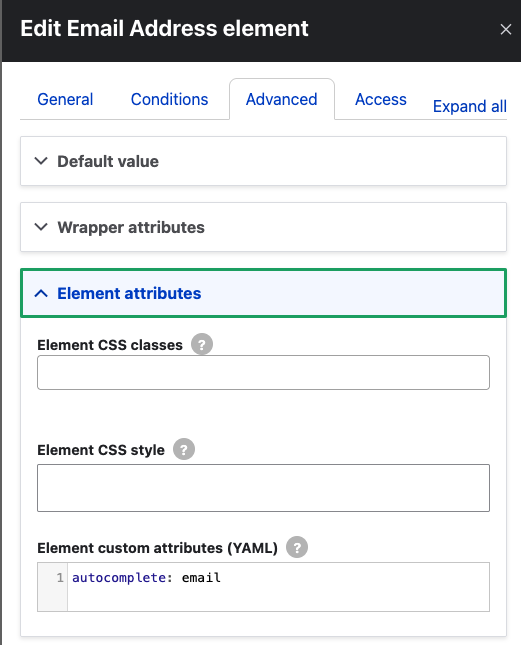
11. Autocomplete for forms
- Webform module apparently does not add these itself, as far as I (MTH) can tell.
- Form fields with autocompletable purposes need autocomplete tables, e.g.:
- autocomplete="email"
- autocomplete="given-name"
- A good listing of values can be found here.
- These can be added by editing the field and going to Advanced, then adding it to Element custom attributes (YAML)
Key Points
aria-labelledbyreferences existing visible text.- It takes precedence over
aria-label,<label>, and inner text. - Use it when:
- You need to label elements that don’t support native labels.
- You want to combine multiple labels (e.g.,
aria-labelledby="id1 id2").
- Avoid using it if native HTML semantics (like
<label>,<caption>,<legend>) suffice.
Main email sent
***********************
Dear Colleagues,
Institute Communications is partnering with the Office of Information Technology (OIT) on the Web Modernization Project to improve how users experience Georgia Tech’s web-based content. As part of this work, Georgia Tech is also advancing digital accessibility in alignment with the U.S. Department of Justice’s (DOJ) updates to Title II of the Americans with Disabilities Act (ADA), which require public universities to ensure their digital content and services are accessible. The Institute is working toward compliance by the DOJ’s April 24 deadline.
To support this effort, a series of communications and resources are rolling out, beginning with this message to campus communicators:
- Campus announcement: An overview of the updated Title II guidance, why it matters, who it applies to, and steps the community can take now. The announcement is available in the News Center and will be featured in the Academic and Research Update (Jan. 16) as well as The Whistle (Jan. 20). Please feel free to reshare.
- Digital Accessibility website: The new site at digitalaccess.gatech.edu serves as the central hub for Title II guidance, training opportunities, and support for websites, instructional materials, multimedia, and more. These resources are designed to support instructors and faculty; administrators and staff; and our technical staff. Please review these resources, register for the training, and help us cross-promote this site, particularly:
- Training workshops, including a session this Friday covering Title II standards for all content providers. There are workshops planned through the month of April with more in development.
- Online Learning Resources and the Web Accessibility Checklist for instructors/faculty and staff (general content providers and technical website leads).
- Get Started for actions individuals can take now.
- Additional communications: Targeted outreach will follow for owners of high-priority, high-visibility websites, with the goal of bringing those sites into compliance by April 24. Information about this phased approach will be shared soon.
Thank you for helping us amplify these resources and supporting a more accessible digital experience for our community.
Rachael Pocklington